Tabs that don’t fight you. Profiles that don’t leak. Sync that doesn’t need an account.
Egg ships a real tab system — vertical layout, color groups, drag, pin, mute, duplicate — and persists everything across restarts.
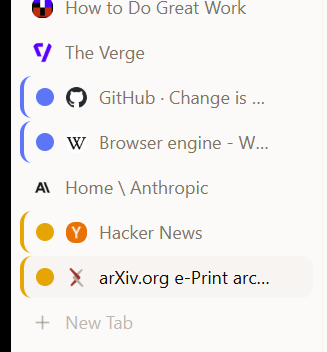
Stack tabs in a left sidebar with a wide preview hover. Drag-to-reorder works the same as horizontal mode.
Right-click any tab → Add to New Group. Auto-color from an 8-color palette. Top stripe in horizontal mode, left stripe in vertical mode.
Each tab is captured once when it’s rendered — reused across boots and tab-switcher views. No periodic snapshotting, no off-screen crawling.
Standard tab-strip actions, plus per-tab idle override so a backgrounded tab can keep working.
Save As, Print, View Source, Inspect, Idle Override, Add to Project. Link context menu adds Add to Project and Open in Background.
Drag tabs out, open isolated profile windows, run two windows side-by-side.
The address bar autocompletes from history and bookmarks, with frequency-weighted scoring so the page you want is the first suggestion.
Suggestions blend domain completion, history, and bookmarks. Pages you visit more bubble up.
Cascading bookmark menu in the toolbar with theme inheritance and adaptive height. Import from Chrome and Firefox in one click.
URLs, visit counts, timestamps. Searchable. Synced once on first device pairing (see Sync below).
Dark/light aware, fast cold start, no third-party trackers.
No Edge or Chromium branding when a page fails to load — just a clean Egg error screen.
Bypasses site service workers during feed and content extraction so you always get fresh data.
Switch between work, personal, and burner identities. Each profile gets its own cookies, passwords, history, color, and avatar.
Each profile is a separate data directory. No cross-contamination of cookies, sessions, or storage.
Open dedicated windows per profile. Clear visual identification via avatar and accent color.
Avatar, color, description, default email, default workspace directory.
Pin a search engine, tracking level, or LLM key per profile. Switching changes everything.
Built-in WebAuthn authenticator and an encrypted password vault. Import from Chrome and Firefox. Synced E2E across paired devices.
ES256 keys, vault-encrypted at rest. Two AAGUIDs — one for synced, one for device-bound. Sites that accept passkeys work natively.
Master-password protected. Auto-fill on form recognition. Vault-locked imports park encrypted and drain on unlock.
Win + MacOn macOS, passkey UV uses Touch ID. Windows UV is pending packaging work.
Mac today · Win pendingElevated import on first launch reads native vaults. Brings credentials over without re-authenticating each site.
Multi-profile autofill for names, emails, phones, addresses. Right-click any field to fill from a saved profile.
WebView2’s built-in password and autofill UI is disabled, so the only fill UI you see is Egg’s.
Pair two devices with a 6-character invite. Bookmarks, passwords, passkeys, settings, and firewall rules sync continuously, end-to-end encrypted. No account, no central cloud store — the relay only ever sees ciphertext.
6-character invite codes with a 15-minute TTL. Short Authentication String verification on first connect. Pairings are device-to-device, not account-based.
Per-pair derived keys. Replay protection via monotonic counters. Cloud holds opaque blobs only.
Bookmarks, passwords, passkeys, app settings (allow-listed), firewall rules. Last-write-wins on per-row timestamps.
Browse history and current open tabs are transferred once during pairing — not continuously, since they bloat fast.
If the receiving vault is locked, encrypted password and passkey batches park in a pending queue and drain on unlock. Nothing is lost, nothing is decrypted prematurely.
Only keys explicitly marked syncable cross devices — theme, search engine, ad blocking, tracking level, LLM provider, etc. Local-only keys (file paths, install state) stay put.
Paste any Chrome Web Store URL, or point at an unpacked folder. The extension APIs are supported by the engine itself, not faked through a compatibility layer. Windows today.
Paste any Chrome Web Store link. Egg fetches the .crx, validates it, and installs.
WindowsPoint at a local directory for development. Reload from the Extensions page.
WindowsExtension action icons appear in the toolbar. Popups render in their own native panel.
54 Chrome extension APIs are built into the engine itself, not shimmed. Storage, tabs, runtime, scripting, webRequest, declarativeNetRequest, and more.
Always-on tracker blocking, parameter stripping, and prefetch suppression — below the page, before content even loads.
~90 ad/tracker domains blocked at the network layer via Network.setBlockedURLs. Per-site whitelist available in the address bar shield.
None, Basic, Balanced, Strict — matching the WebView2 setting. Strict breaks some sites; Balanced is the default.
40+ tracking params (utm_*, fbclid, gclid, …) stripped from URLs on load and on copy. Bounce-tracking redirects bypassed.
Browsers ping ad networks before you click. Egg blocks that.
Sites can’t silently read your clipboard. Pasting requires your action.
Hide your local IP from sites that abuse WebRTC’s ICE candidates.
Standard file downloads, plus a video saver that knows about every site.
Persistent list of every download with progress, cancel, open file, open folder. Available at egg://downloads.
Bundled yt-dlp resolves stream URLs and saves the actual video file. Works on YouTube, Vimeo, Twitter, TikTok, and a thousand other sites.
Mini progress bar across the bottom while downloads run. Click any item to open or reveal in folder.
Inherited from WebView2. Netflix, Spotify, and other DRM-protected media play.
The settings power users care about, mostly hidden until you need them.
Drag languages into your preferred order. Sets the HTTP Accept-Language header and JS navigator.languages.
Right-click a tab to silence the audio without leaving the page.
Tell a tab the page is "always active" so background timers don’t throttle.
WebView2 default UA gets a custom suffix — sites that gate features by browser still work.
The basics, in the right-click menu.
Right-click any link → Download Linked File. No surprise navigations.
Free to download. Bring your own API key.
Download for WindowsAlso available for macOS