Agent

An agent that browses with you.

Chat alongside any tab. Hand off tasks. Watch it click, fill, read, and reason. Bring your own model key, run one on-device, or mix and match per agent.

Chat & tools

Multi-turn chat with real tool execution.

Egg’s agent isn’t a chatbot wrapped around your browser. It runs in the Egg Gateway daemon, calls tools, executes plans, and streams output back into the chat.

Chat anywhere

Open the agent panel from the sidebar or the kebab menu. It runs alongside any tab and stays open across navigation.

Streamed output

Token-by-token streaming for chat. Tool calls render with collapsed/expanded views — you see what the agent did, not just what it said.

Plan approval

For multi-step tasks, the agent writes a plan and pauses for your approval before executing. You can edit or reject any step.

Tool execution loop

The agent calls a tool, reads the result, decides the next step. The loop runs until the task is done or stuck.

Context compaction

T1/T2/T3 conversation compression near context limits. You can run for hours without losing the early thread.

Session persistence

Conversations survive restarts. Reopen the panel and pick up where you left off.

Skills

Skills you toggle. Skills you write.

Skills are multi-file folders that bundle instructions, examples, and tools for a specific domain. Toggle which skills each agent has. Add your own as a folder.

Web research

Open URLs, extract content, follow links, build a synthesis. Falls back to search when starting from a topic instead of a URL.

Google Workspace

40 built-in tools across Gmail, Calendar, Drive, Docs, Sheets. Authorize once per profile.

Code execution

Run Python, JavaScript, or shell snippets in a remote sandbox. The agent reads stdout/stderr like any tool.

Media processing

FFmpeg-driven video and audio operations — trim, transcode, extract frames, concatenate. Local execution, no upload.

Local files

Read, write, and search files inside configured zones. The firewall enforces zone boundaries.

Artifact creation

Write Markdown, code, or structured documents straight to a workspace. The agent picks the right artifact type for the task.

Execution discipline

Built-in skill that constrains how the agent reasons — check before acting, summarize before continuing, verify before claiming success.

Mermaid diagrams

Generate flowcharts, sequence diagrams, and architecture diagrams as embedded mermaid blocks.

Custom skills

Drop a folder with a SKILL.md and tool definitions into the skills directory. Egg picks it up automatically. Three types: general, intent-routed, site-scoped.

Models & keys

Your agents, your rules.

What powers the agent is your call — per agent, per task, per minute. Bring keys. Run local. Swap providers. Egg doesn’t hold the wallet.
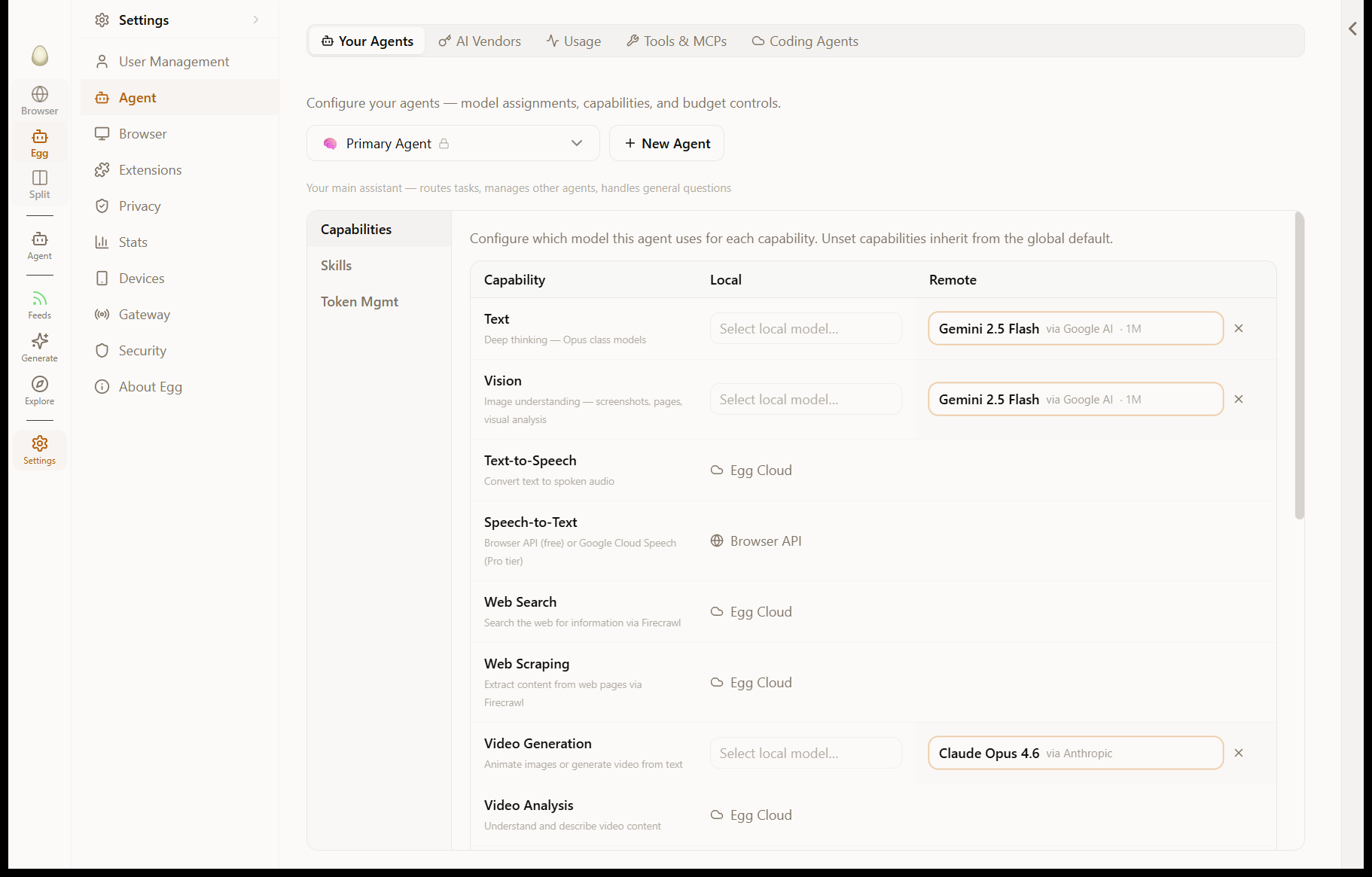
Per-capability model routing in Egg's agent settings: separate model assignments for text, vision, speech-to-text, text-to-speech, video generation, web search, and web scraping

Bring your own key

Anthropic, OpenAI, Google, OpenRouter. Direct API calls from the daemon — no proxy, no relay, no extra hop.

Local models via Ollama

Run Llama, Mistral, Qwen, DeepSeek, or any Ollama-compatible model on your hardware. Zero cloud dependency.

Per-agent model assignment

Use Claude for the Primary, GPT-4 for code, a local Qwen for a research agent — all in the same conversation.

Per-task model swap

Override per turn. "Use cheap" or "use big" without leaving chat.

Vision auto-swap

When a task needs vision, Egg automatically uses a vision-capable variant of the agent’s model. No manual config.

Token budgets

Per-agent token budgets, daily usage tracking, alerts when an agent burns through its allowance.

300+ models via OpenRouter

One key, every model. Switch on Tuesday. Change your mind on Wednesday.

Browser automation

The agent uses the browser. Not an API.

Most agents fake the web through scraping APIs and language models pretending to know HTML. Egg runs the agent inside the actual browser, using the same DOM you see.

CDP-backed micro-commands

Click, type, scroll, hover, snapshot, navigate. Each runs over Chrome DevTools Protocol against the real tab.

Three layers

Low-level CDP commands → mid-level page primitives (find, fill_form, get_visible_text) → high-level skill verbs the agent uses.

Visual confirmation

The agent takes screenshots when it’s uncertain. Vision-capable models inspect the result before continuing.

Logged-in sessions

The agent uses your real cookies and sessions. No bot fingerprints, no captchas the agent can’t solve.

Recordable

Watch what the agent does. Replay any sequence. Export as a script for the demo system.

Memory & personas

Agents that remember.

Persistent facts, preferences, context. The agent remembers across conversations, across days, across sessions.

Agent memory

Facts and preferences saved automatically when relevant, surfaced when useful. Editable from Settings.

Memorize anything

Ctrl+M (Cmd+M on Mac) on any page, selection, or chat turn commits it to memory.

Personas

System agents (Primary, Studio, Cheap) plus user-created agents. Each has a personality, model assignments, skills, and memory.

Per-agent budgets

Constrain how much each agent can spend, per day. Memory and persona are independent of budget.

Background thinking

The Primary agent maintains a curiosity queue — topics it’s thinking about between conversations. Ask "what are you thinking about?" to see.

Sandboxed execution

Code execution, isolated.

The agent runs untrusted code in remote sandboxes — not on your machine. Local code execution is disabled by default.

Remote sandbox (E2B)

Python, Node, shell. Full filesystem inside the sandbox, network egress, package install. Sandbox spins up per task and tears down after.

Local execution off by default

The local code execution skill is disabled out of the box. Enable it explicitly per agent if you want it.

Job Object isolation

When local execution is enabled (Windows), child processes run in a Job Object so they can’t escape or persist.

Outputs streamed

stdout, stderr, file writes — all stream back into the chat as they happen.

Integrations

The protocols, supported.

MCP for community tools. Built-in MCP servers for the systems people use most. AG-UI compatibility for the agent UI standard.

MCP servers

Generic Model Context Protocol client. Tool naming convention mcp__{server}_{tool}. Add a server, get its tools.

Built-in: Google Workspace

Gmail, Calendar, Drive, Docs, Sheets, Forms, Slides — 40 tools, no setup.

Built-in: GitHub

Issues, PRs, code search, file fetch. Authorize once.

AG-UI compatible

Egg’s chat surface speaks the AG-UI streaming standard, so external tools and dashboards can render the same conversations.

Chrome AI APIs

The browser exposes the new window.ai.* APIs (Prompt, Summarizer, Translator, Writer, Rewriter) backed by your configured model.

Architecture

The Gateway daemon does the work.

Agent execution doesn’t live in the Tauri app. It lives in a separate Rust daemon that the app launches and talks to over HTTP.

Egg Gateway daemon

Standalone Rust process. The app spawns it on launch and re-attaches on restart. Single source of truth for agent state.

Survives the app

Long-running tasks (research, monitors, watchdogs) keep going even when the app window is closed.

One conversation, one process

Tool execution, skill loading, streaming, context compaction — all in one place. The Tauri app is a UI shell.

HTTP API

Local-only HTTP API with bearer auth. External tools (terminals, dashboards) can drive the agent the same way the app does.

What’s next

Try it.

Free to download. Bring your own API key.

Download for Windows

Also available for macOS